
Anime Shop Simulator Online Co-op
Four-player Steam co-op: how to host, how to split the shop, and what to do when server create still fails.
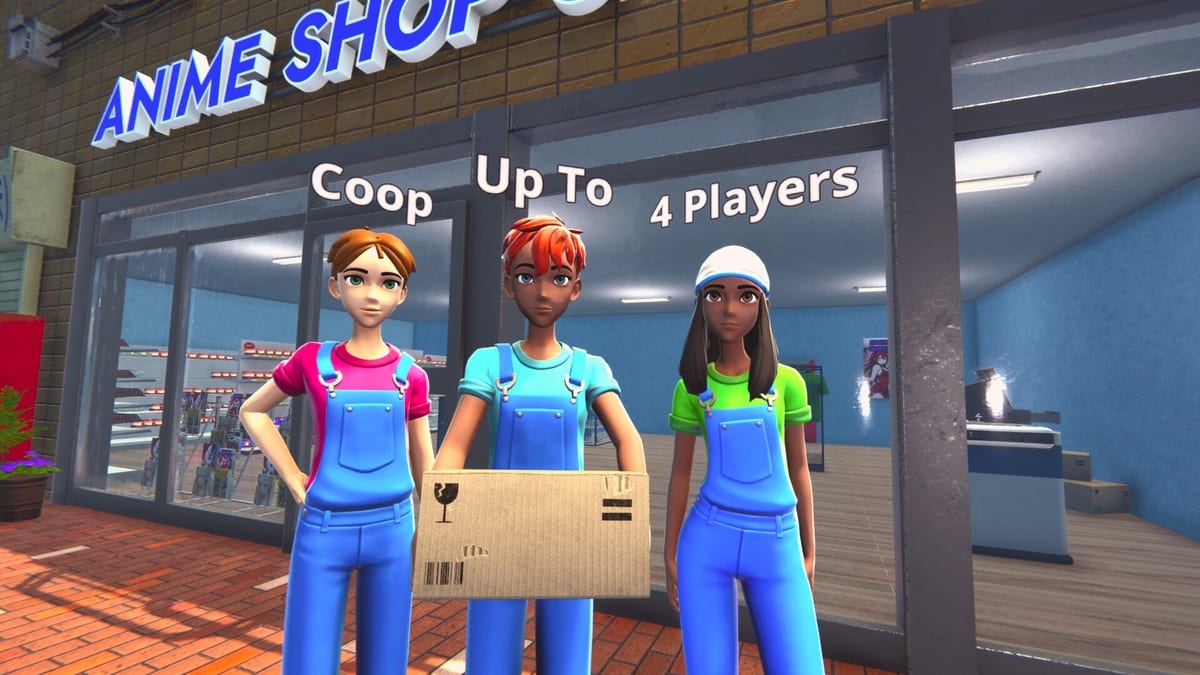
Anime Shop Simulator is One More Time’s first co-op shop. Online play supports up to four players in the same first-person store: one till, one stockroom, one computer, and a lot of cardboard. The demo includes that 4-player mode. The full game on 11 September 2026 is pitched as the same idea with more catalog, more events, and extra social toys (outfits, pranks, dances) called out in the August 2026 crew announcement.
This is online co-op, not local split-screen. Everyone needs a PC copy of the demo (app 3444070) or, later, the full app. If you have not learned the solo loop, spend thirty minutes in Getting Started so you are not teaching licenses over a failing lobby.
How 4-player online co-op works
One player hosts. Others join through the in-game multiplayer flow (Steam friends / server list — use whatever the current demo menu labels). You share the shop: money, stock, licenses, and the physical world. Anyone can theoretically grab a box, open the computer, or scan a guest. That freedom is the fun and the failure mode.
There is no separate “owner HUD.” Discipline is social. If two people order at once, you can double-spend. If four people unbox, you will have no sealed facing. If nobody watches the door, the queue becomes a museum audio log.
PvP is part of the same session. The TCG minigame is explicitly a thing you can play versus each other between customers. Treat it as a break toy, not as player four’s only job, unless the shop is already overstaffed.
Demo 1.4.6 synchronized in-game tasks so checklists complete for everyone at once. If a tutorial tick still looks desynced, update the demo before you assume a friend is griefing the objective.
Steam host and join
Practical host checklist from demo nights and studio hotfixes:
- Every client on the same demo build. Mixed patches are how “it works for me” starts.
- Host from a machine that can hold a framerate at the register. Hitching feels like a missed scan. See system requirements.
- Host after a solo save exists if you care about that layout; confirm in the current build whether joiners drop into the host’s shop (expected) rather than a ghost copy.
- Have a voice channel. This genre dies in typed chat while a guest waits for change.
- If create/join fails, one host only. Do not have three people press create at the same time.
Friends-only sessions save you from random joiners emptying the till. If the demo offers a public server browser, use a name your group will recognize and close it when you are done.
Server-create fixes from studio news
Players hit “failed to create server” (sometimes typed “sever” in threads) as soon as the demo landed. One More Time answered with hotfix v1.4.2 and 1.4.3 (26 February 2026): server creation logic was reworked so impossible-to-create or impossible-to-join cases should be reduced.
If you still see the error after that family of patches:
- Force-update Steam and verify the demo cache.
- Restart the game, not just the menu.
- Disable overlapping VPNs / overlay experiments one at a time.
- Try a different host in the group — some NAT setups still lose.
- Check demo notes for a newer hotfix before you reinstall Windows.
Demo 1.5.0 (26 May 2026) did not add content; it was performance, bugs, and architecture. Co-op stability is exactly the kind of thing that work is for. A later demo with new mechanics was promised — join rules may change again before September. This page will age; the Steam news hub ages faster.
Role split that actually works
Copy this onto a sticky note. It matches the studio’s own “divide responsibilities” pitch and the jobs that exist in the demo.
Two players
- P1: Register (scan, numpad change, ID checks).
- P2: Restock + computer (orders, prices, trash, holes).
Three players
- P1: Register.
- P2: Restock / stockroom path.
- P3: Floor + computer (greet, unbox overflow, price tweaks, watch empty bays).
Four players
- P1: Register.
- P2: Restock (stockroom to shelf, never empty the last sealed facing).
- P3: Events / computer (when signings or tournaments exist; otherwise licenses, orders, and the TCG table).
- P4: Floor (pathing, trash, impulse facings, special clients).
Longer role cards live on co-op roles. The important part is one owner per station. Two cashiers without two registers is a fight. Two people on the computer is a double order. A dedicated ripper who ignores holes will bankrupt a card bay — send them to TCG cards after the shift.
Rotate at natural lulls, not mid-ticket. The register person should already know controls so the numpad is not a teaching moment during a rush.
Etiquette and cash discipline
Co-op etiquette is just retail, with extra teleporting bodies.
- Call “ordering” before you touch the computer. State the dollar amount.
- Never dump the shared till into one vanity license or one booster case. The solo rule — keep a buffer, watch sell-through — is stricter when three other people still need manga.
- Restock your bay before you decorate. Wallpaper is not a personality if the figure riser is empty.
- Trash your own cardboard.
- Do not stand in the inbound queue to have a conversation. Move to the stockroom or the flex rectangle from shop layout.
- ID checks and special clients belong to the person who started the interaction. Do not mash the prompt for them.
- Pranks and dances (promised louder at launch) wait until the line is gone. A funny emote in front of the scanner is a missed scan.
If someone wants to “just vibe,” give them floor or decoration after close, not the drawer.
Events and TCG between rushes
Four people make events possible. A signing or tournament without a restock partner will sell the store empty. The events player sets the table off the aisle, the floor player keeps the path, the restock player feeds the spike, the cashier eats the queue.
Duels use the same staffing math: two can play, two must still be a shop. If you only have two humans, skip the tournament until the rush dies.
Host nights with a time box. Demo content is finite; the fun is the chaos, not a completionist license grind. When you are done, save (the demo lists save anytime), close the lobby, and write down which role felt understaffed. That note is worth more than another unbox.
For a first joint session, walk the demo walkthrough objectives once so nobody “discovers” the license wall live. For whether the co-op loop is the reason to wishlist, read the review after you have hosted one night that did not melt.
Frequently Asked Questions
Quick answers for demo players and launch-day shopkeepers.
How many players can join Anime Shop Simulator co-op?
Up to four, online, in the demo and in the 1.0 pitch. There is no local split-screen promise. Each player needs the Steam demo or, later, the full game.
What does “failed to create server” mean?
An early demo host bug. Hotfix 1.4.2 / 1.4.3 reworked server creation. Update the demo, restart, and try a different host if it persists. More patch context is on demo notes.
Who should sit on the register?
The player who already knows scan and numpad change. Everyone else restocks, runs the computer, or works the floor. See shop controls and co-op roles.
Can we all open booster packs together?
Not if it empties the sealed facing. Appoint one ripper, keep packs on the shelf, and duel between customers. Rules of keep-versus-sell are in TCG cards.
Should we start co-op before learning solo?
A short solo shift helps. Licenses, orders, and the stockroom path are easier to teach when the host already knows Getting Started.
Will launch add more co-op toys?
Studio posts mention outfits, pranks, and dances around the September 2026 release. Treat those as 1.0 flavor. The demo already has the important part: four bodies, one shop.