
Anime Shop Simulator Guides Hub
First-hour, demo, layout, TCG, co-op, and event playbooks for the Steam shop sim — full game still upcoming.
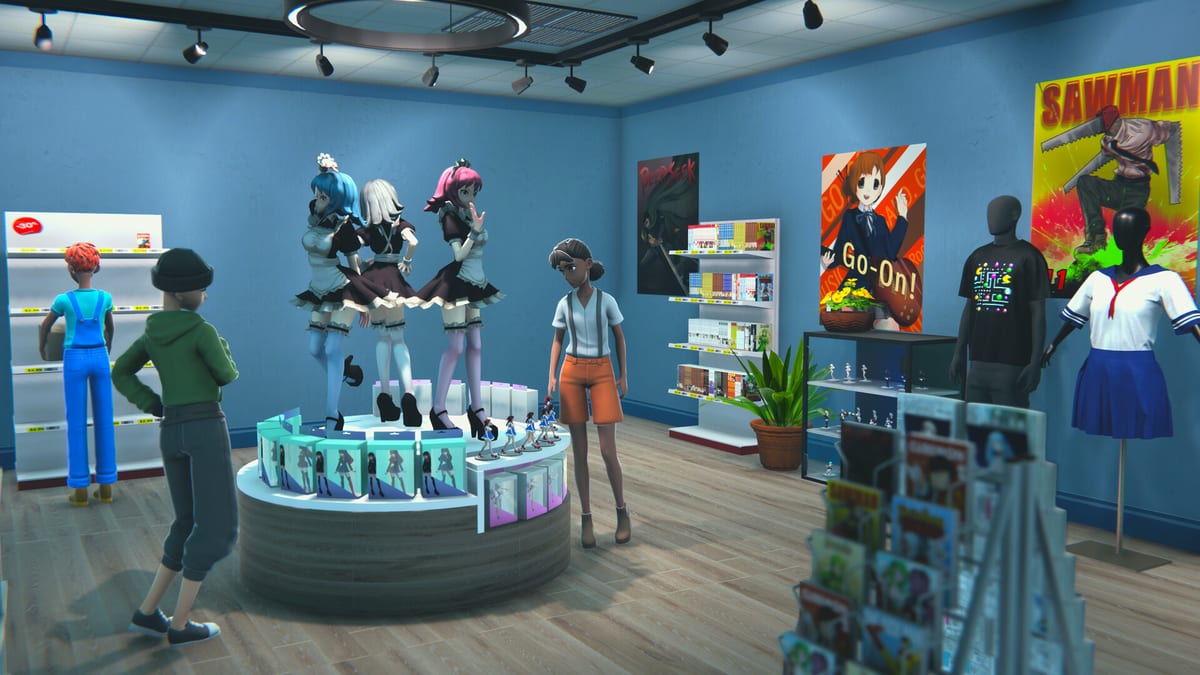
This hub is the map for every Anime Shop Simulator guide on the wiki. The full Steam release is scheduled for 11 September 2026. A free demo (app 3444070) has been playable since 19 February 2026, so most advice below comes from that build, studio news, and public playtests — not from a finished 1.0 campaign.
Start with Getting Started if you have not named a shop yet. If you only want to know what the download actually contains, jump to the demo walkthrough. Come back here when you need the next specialist page instead of rereading the same overview.
Developer One More Time (with publisher Polnoch) is building a first-person otaku store, not a Roblox tycoon and not a licensed anime collab. You stock manga, figures, collectible cards, apparel, dakimakura / body pillows, pins, and keychains drawn from fictional IPs. The loop is physical: walk the floor, haul boxes, face the register, and keep aisles walkable while customers browse.
How to use this hub
Read in this order unless you already know the pain point:
- Getting Started — licenses, first order, cash buffer, when expansion is a trap.
- Demo Walkthrough — install path, inclusions, bugs, how the demo maps to launch.
- Shop Controls — first-person grab, numpad checkout, save-anytime notes.
- Shop Layout — aisle flow, shelf types, queue, decoration versus throughput.
- How to make money — cash buffer, licenses, restock, when not to unbox.
- TCG Cards — boosters, keep versus sell, displays, PvP minigame.
- Card battles — decks, table vs till, stuck-in-battle hotfixes.
- Online Co-op — four-player roles, Steam join, server-create fixes.
- Events and Signings — autographs, tournaments, popularity versus floor staff.
- Demo Review — who the game is for and whether to wishlist.
Same-category pages interlink on purpose. If a sentence on layout mentions the register, it should send you to controls; if it mentions packs, it should send you to TCG cards.
First hour and the demo
The demo is the only public way to practice before September. It lets you name the shop, buy a handful of product licenses, order from the back-office computer, stock shelves, scan at checkout, crack boosters, and invite friends into online co-op (up to four). It does not represent the full catalog, every event type, or every expansion room the marketing shows.
Playtest reports keep repeating the same first-hour mistakes: buying every license at once, dumping the till into one booster carton, hiking prices before you have sell-through data, and leaving empty facings while you decorate wallpaper. The Getting Started page is written to stop those habits. Pair it with demo notes and the release date page so you do not treat a demo ceiling as the 1.0 economy.
Floor, stock, and checkout
Anime Shop Simulator is closer to a specialty retail shift than a spreadsheet tycoon. Customers path from the door, through manga and figure runs, toward the counter. If a pallet or a dakimakura dump blocks that path, the queue dies even when your prices are fair.
Use shop layout to plan height, impulse racks, and storage. Use controls so the numpad, scan, and change drawer are muscle memory before a Saturday rush. Pricing math and markup experiments live on the pricing tool page; product rankings belong on the products tier list.
A short floor mantra, expanded on the child pages rather than copied as a speech:
- Restock a hole the moment it sells through.
- Never spend the last of your cash on a single order.
- Watch what actually leaves the shelf before you raise tags.
- Keep aisles wide enough for two people and a box.
- Split co-op jobs instead of four people fighting over the register.
Cards, events, and co-op
The TCG layer is not a side toy. Boosters, singles, pins, and keychains (common through ultra rare) are both inventory and a collection you can display. The in-game PvP TCG minigame lets friends duel between customers. TCG Cards covers order size and unbox discipline. Card battles covers decks, tables, and the 1.4.5 exit bugs. If the till is the problem, not the packs, read how to make money.
Events — autograph signings, TCG tournaments, and festival beats — spike popularity and also spike labor. If you host a signing with nobody on restock, you will sell the store empty in twenty minutes. That staffing puzzle is the whole point of events and the co-op role split (register / restock / events / floor). Special shoppers and age-gate ID checks for restricted merch are catalogued under special clients and co-op roles.
Pre-launch reading order
Because 1.0 is still upcoming, treat every number in these guides as demo-era. Studio patches already reworked server creation after “failed to create server” reports, synced co-op tasks, and shipped a technical demo 1.5.0 with no new toys. Bindings, license prices, and markup caps can move again before 11 September 2026.
If you are deciding whether the loop is for you, read the honest demo review after one session, not before. If you are assembling a four-person Discord night, read co-op plus system requirements so the host machine is not the bottleneck. Official store, social, and community links sit on the wiki links hub. Customer-type notes live on the customers tier list.
This is a Steam PC title. There are no Roblox codes or injected scripts to farm; skip the codes page unless you are checking that it stays empty on purpose.
Use the child guides as working documents. When One More Time opens more of the shop in later demo drops or at launch, the specialist pages should change first — this hub only needs to keep the map honest.
Frequently Asked Questions
Quick answers for demo players and launch-day shopkeepers.
Which guide should I read first in Anime Shop Simulator?
Open Getting Started for the first hour, then the demo walkthrough so you know which toys are missing until 11 September 2026.
Is the full game already on Steam?
No. The full release is scheduled for 11 September 2026. The free demo has been playable since 19 February 2026 and is the build these guides describe.
Does Anime Shop Simulator have co-op in the demo?
Yes. Online co-op supports up to four players in the demo. Role split, join steps, and server-create fixes are on the co-op guide.
Are the anime brands in the shop real licenses?
No. Manga, figures, cards, apparel, and dakimakura use fictional IPs, not collabs with existing studios. That is why the TCG and poster art will not match a show you already watch.
Where do layout, TCG, and events live on this wiki?
Aisles and expansion are in shop layout. Packs and the PvP minigame are in TCG cards. Signings and tournaments are in events.
Should I still read a review if I already like shop sims?
Yes. The demo review compares this title to TCG Card Shop Simulator and Tavern Manager Simulator, and it flags demo limits so you wishlist with clear eyes.