
Anime Shop Simulator Demo Walkthrough
Install app 3444070, learn what the February 2026 demo actually contains, and run a full session without treating it like 1.0.
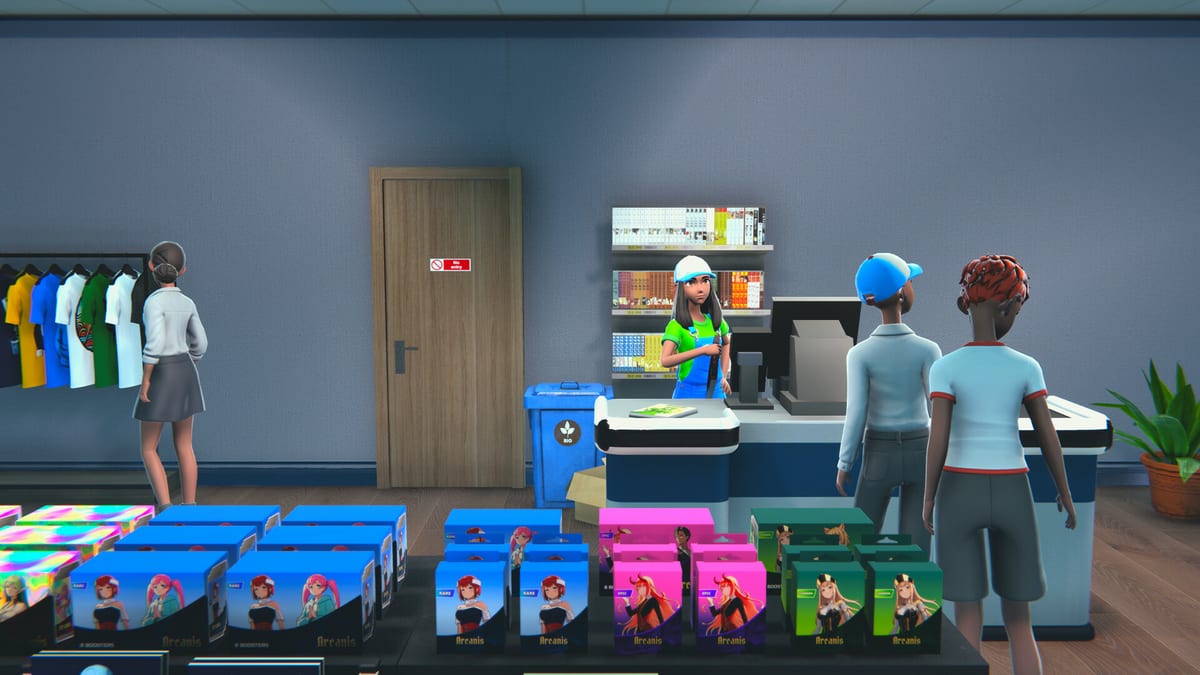
The Anime Shop Simulator demo is a separate Steam app (3444070) from the upcoming full game (3393280). It went live in February 2026 (studio posts and this wiki use 19 February; some store modules show 18 February). The 11 September 2026 1.0 build is not in your library yet. This walkthrough is how to install the demo, what you can finish inside it, which bugs to expect, and which muscles still matter at launch.
If you have not run a single shift, skim Getting Started first so licenses and cash buffers are not a surprise. Come back here for demo-specific walls.
Install the Steam demo (app 3444070)
On Steam, open the Anime Shop Simulator store page or search Anime Shop Simulator Demo. Use Install Demo / play the demo app — do not wait for the paid package. The demo is free. After it lands in your library, verify disk size against system requirements if you are on a thin laptop.
Languages on the demo storefront include English, French, Italian, German, Spanish, and a wider interface list. Pick the language before you name the shop so UI labels match this wiki’s English paths.
Create a solo save for your first full-demo run even if you intend to co-op. Multiplayer is easier to debug once you already know where the computer, stockroom, and register are. Steam Cloud is listed on the full app; treat demo saves as local until you confirm they carry forward — One More Time has not promised that every demo slot imports into 1.0.
What the demo includes
Studio copy for the demo is unusually honest. You can:
- Run a first-person anime store with manga, figures, and trading cards as the core loop.
- Organize shelves and poke at layout, including a back stockroom.
- Order product after buying a limited set of licenses on the computer.
- Set prices and take cash or card at the register.
- Order and open booster packs, hunt rares, and start a collection.
- Play the in-game TCG / PvP minigame.
- Play solo or online co-op with up to four.
- Name the shop and tinker with light decoration.
Playtests also show a trash flow for empty boxes, a stock panel that doubles as a price board, and a checkout that accepts numpad change (see controls). Some rooms and props — vending machines, upstairs hints — exist as set dressing you cannot fully use.
That is already a complete “Saturday shift” fantasy. It is not the entire marketing checklist.
What the demo leaves for launch
Treat these as not guaranteed in the demo, even if trailers show them:
- The full license tree (playtesters saw about five licenses; the rest sat behind the paid game).
- Broad apparel, dakimakura, pin, and keychain depth compared with manga/cards.
- Full shop expansion and every decoration / wallpaper preset.
- Staff hiring — demo reviews explicitly note you cannot hire employees, which is why solo feels like a sprint.
- The complete event suite (autograph signings, TCG tournaments, festivals) as a long-term popularity career. The events page explains the 1.0 pitch; do not assume every type is unlocked in 3444070.
- Character customization (outfits, appearance) that the August 2026 “gather your crew” post promised for release.
- Every special client and ID-check scenario at full rate. Those systems are real in the design; density is a launch question.
If a button is visible but dead, it is usually a 1.0 teaser, not a broken click. Check demo notes after each studio patch before you file a bug on a locked feature.
A full-demo run, hour by hour
Hour 0–1. Name the shop. Buy a single license. Order a manga-heavy mix plus a small card test. Stock every facing you paid for. Open the door. Survive checkout with the numpad. Do not decorate. Do not expand. This matches Getting Started.
Hour 1–2. Reorder only what sold. Restock holes the moment they appear. If cash recovered, buy the next license you can actually fill. Crack a few boosters in the back so the TCG binder exists, but leave sealed product on the floor. Watch which SKUs die and which become museum pieces.
Hour 2–3. Rearrange. Move boosters to a low dense bay, figures to eye level, manga to the door run. Clear cardboard. If a friend is joining, switch the save to co-op and split register versus restock — do not invent a four-person cashier line. If the lobby fails, skip to the server-create notes on co-op rather than reinstalling.
End of demo content. You will hit a license wall, a furniture wall, or a “I have seen this customer path twenty times” wall. That is the demo doing its job. Stop, write down what felt good (physical stocking, card ripping, four-player chaos), and only then read the review. A completionist video titled around unlocking everything in the demo still spends most of its time on licenses, a game table, pack opening, and a first duel — that is the real ceiling.
Bugs and patches to expect
This is an active demo, not a frozen vertical slice.
- Failed to create server / failed to create sever (the typo is in player posts). Hotfix 1.4.2 / 1.4.3 (late February 2026) reworked server-creation logic so host and join should fail less often. If it still happens, verify both clients are on the same demo build and retry from the menu rather than overlapping hosts.
- Co-op tasks out of sync. Demo 1.4.6 (March 2026) made in-game tasks complete for every player at once. If a checklist still desyncs, assume a later patch is required and play the physical loop anyway.
- Demo 1.5.0 (26 May 2026) added no new content. It was performance, bug fixes, and an internal architecture pass. A studio note promised a later demo drop with new mechanics; until that lands, do not wait for new licenses inside 1.5.0.
- Solo stress: reviewers who refused the demo often cited the music loop, thin pricing headroom, and no hired staff. Those are design complaints more than crashes, but they affect how long a full-demo run feels.
- Save anytime is listed as an accessibility feature on the demo page — use it before you experiment with a huge order.
Report fresh bugs through Steam discussions or the studio Discord rather than inventing workarounds on this wiki. Patch language belongs on demo notes.
How demo skills map to 11 September 2026
What should transfer:
- Restock holes immediately.
- Keep a cash buffer; never all-in on one carton.
- Read sell-through before hiking tags.
- Keep aisles walkable.
- Numpad checkout.
- Co-op role split: register, restock, events, floor.
What will probably change:
- License prices, starting cash, and markup tolerance.
- How hard events hit popularity versus labor.
- Collection size for cards, pins, and keychains.
- Expansion cost versus extra registers.
- Whether demo saves import.
Wishlist the full app (3393280) if the physical shop loop clicked. Ignore anyone calling 1.0 “out” before 11 September 2026. For a verdict on tone, AI-art discourse, and comparisons to TCG Card Shop Simulator, use the demo review. For the calendar itself, use release date.
Frequently Asked Questions
Quick answers for demo players and launch-day shopkeepers.
What is the Steam app ID for the Anime Shop Simulator demo?
The demo is app 3444070. The upcoming full game is app 3393280, scheduled for 11 September 2026. Install the demo from the Steam demo page, not from a third-party mirror.
Does the demo include 4-player co-op?
Yes. Online co-op for up to four is part of the advertised demo. If hosting fails, see the server-create notes in the co-op guide and demo notes.
Can I unlock the entire catalog in the demo?
No. Playtests show a short license list (about five) and locked remaining products. Treat the wall as the demo boundary, then read Getting Started for how to spend the licenses you do get.
Will my demo save carry into the full release?
Do not count on it until One More Time says so in patch notes. Play the demo to learn the loop; keep expectations for 1.0 import unconfirmed.
Why did demo 1.5.0 add nothing new?
The 26 May 2026 update was technical: performance, bug fixes, architecture. New mechanics were promised for a later demo drop. Track that on demo notes.
Is the demo enough to decide on a wishlist?
Yes. A two-hour run covers stocking, till work, packs, and co-op chaos. Pair this walkthrough with the review after you have played, not before.